Elgato Stream Deck + vs Stream Deck MK.2: Rotary Dials or 15 LCD Keys?
Elgato Stream Deck + Audio Mixer & Controller vs Elgato Stream Deck MK.2
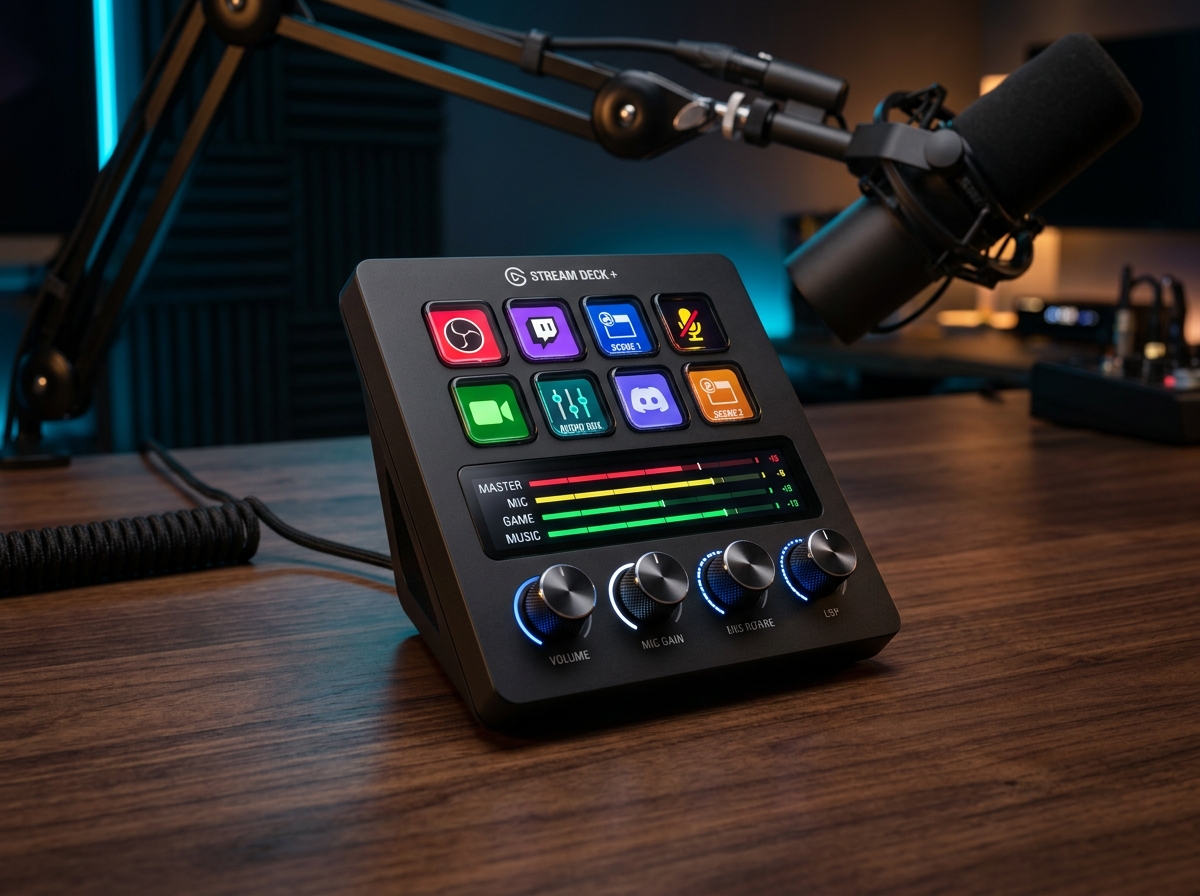
Elgato Stream Deck + Audio Mixer & Controller
- ✓ Four 360-degree push-dials make adjusting audio levels, zooming timelines, and color grading effortless
- ✓ Unlocks Elgato's full Wave Link multi-track digital audio mixer and VST effects for any microphone
- ✓ Interactive full-color LCD touch strip displays live audio meters and swipes smoothly across 10 pages
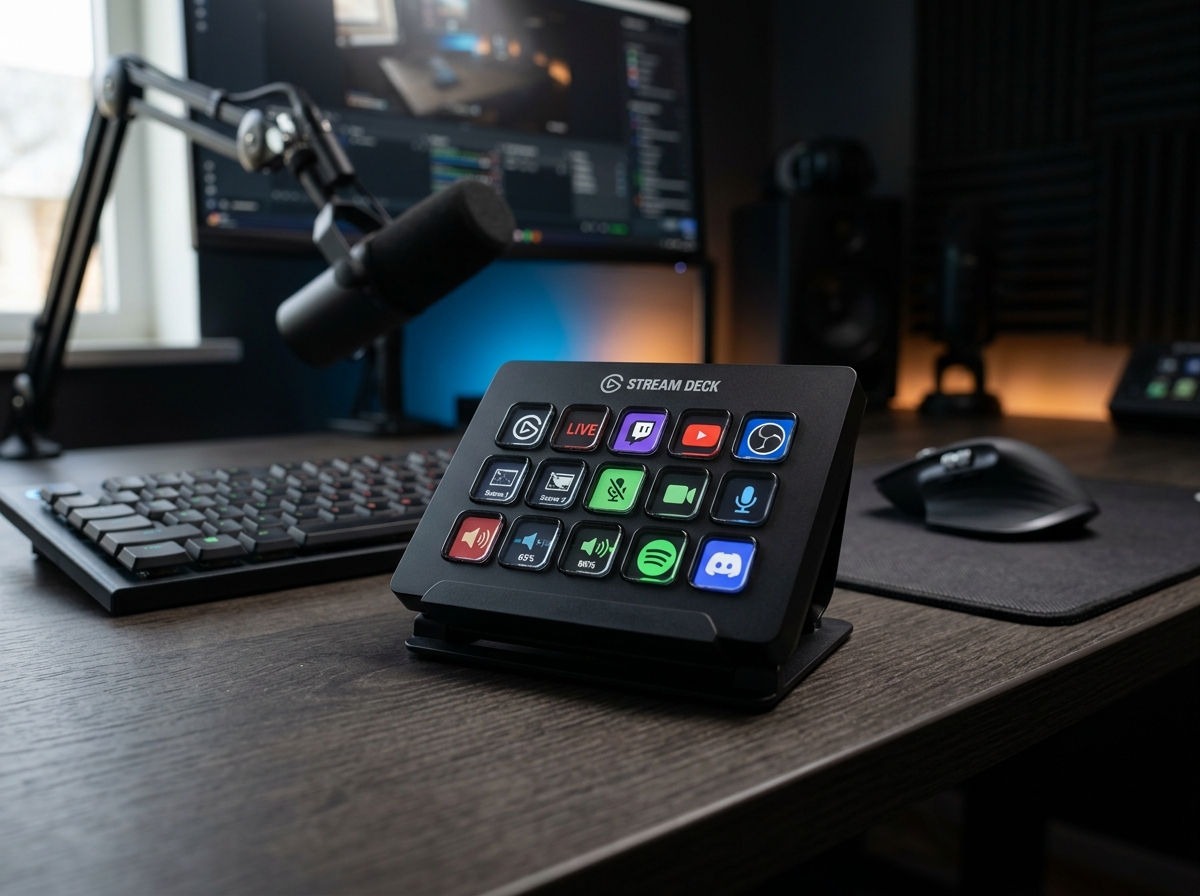
Elgato Stream Deck MK.2
- ✓ 15 physical LCD keys provide nearly double the immediate one-tap macro buttons on a single screen
- ✓ Compact, low-profile angled stand tucks easily beneath low-hanging gaming monitors
- ✓ Swappable magnetic front faceplates allow custom desk aesthetics
For just $30 more, the Elgato Stream Deck + adds four machined rotary push-dials, an interactive LCD touch strip, and automatically unlocks the powerhouse Wave Link digital audio mixer—making it vastly more versatile for streaming, video editing, and daily desk control.
Side-by-Side Technical Comparison
Direct spec-for-spec breakdown
| Feature | Elgato Stream Deck + Audio Mixer & Controller | Elgato Stream Deck MK.2 |
|---|---|---|
| Physical LCD Keys | 8 Larger Customizable LCD Keys | WINNER 15 Standard Customizable LCD Keys |
| Rotary Encoders (Dials) | WINNER 4x 360° Machined Push-Dials | None |
| Interactive Touch Bar | WINNER 108 x 14 mm Full-Color LCD Touch Strip | None |
| Wave Link Audio Mixer Unlock | WINNER Yes (Full Multi-Channel Mixer Included) | No (Requires Separate Wave Mic) |
| Hardware Modularity | WINNER Supports XLR Dock & USB Hub Backpacks | Swappable Cosmetic Faceplates Only |
| Page Navigation | WINNER Instant Horizontal Touch Strip Swipe | Requires Dedicating 2 Keys to Next/Prev |
| Dimensions & Weight | 140 x 138 x 110 mm / 465 g | WINNER 118 x 84 x 25 mm / 270 g (with stand) |
| Retail Price | $179.99 | WINNER $149.99 |
If you are building a modern creator studio, streaming rig, or high-efficiency home office, you will inevitably face the ultimate Elgato dilemma: Should you buy the 15-key Elgato Stream Deck MK.2, or spend $30 more for the rotary-equipped Elgato Stream Deck +?
At first glance, dropping from 15 LCD buttons down to 8 might seem like a downgrade. However, once you factor in the four 360-degree tactile encoders, the swipeable LCD touch bar, and the hidden software license baked into the Stream Deck +, the value proposition flips dramatically. Here is how they compare in daily use.
1. Buttons vs. Dials: One-Shot Macros vs. Continuous Control
- Elgato Stream Deck +: The top half houses 8 oversized LCD keys, while the bottom half features four aluminum rotary dials paired with an interactive touch strip. Whenever your workflow involves gradual adjustments—balancing Discord voice chat against game audio, scrubbing frame-by-frame in Premiere Pro, adjusting brush sizes in Photoshop, or dimming Philips Hue lights—twisting a physical metal knob is infinitely faster and more natural than mashing a button twenty times.
- Elgato Stream Deck MK.2: The MK.2 is a pure 5x3 grid of 15 LCD keys. If your daily workflow consists strictly of binary actions—switching OBS camera scenes, firing soundboard effects, pasting boilerplate code snippets, or launching website folders—having 15 dedicated visual icons staring at you simultaneously minimizes page-flipping.
2. The Secret Software Advantage: Wave Link Digital Audio Mixer
- Elgato Stream Deck +: Plugging the Stream Deck + into your PC or Mac automatically unlocks a full license for Elgato Wave Link—arguably the best virtual audio routing and mixing suite on the market. Even if you use a third-party USB or XLR microphone, Wave Link lets you split your audio into 9 independent virtual inputs (Game, Music, Browser, Voice Chat, System), apply VST plugins like EQ and noise gates, and control every fader in real time using the four physical knobs.
- Elgato Stream Deck MK.2: The MK.2 only runs the standard Stream Deck macro software. Unless you separately purchase an Elgato Wave microphone or Wave XLR interface, you do not get access to the Wave Link mixing engine.
3. Page Navigation & Desktop Footprint
- Elgato Stream Deck +: Even though it only has 8 physical keys per page, you never have to sacrifice a button for a “Next Page” arrow. Swiping your finger left or right across the center glass touch strip glides instantly across up to 10 pages of keys and dial assignments. Furthermore, its rear support bay can be upgraded with Elgato’s bolt-on XLR Dock, turning the unit into a unified microphone interface.
- Elgato Stream Deck MK.2: To navigate across multiple pages on the MK.2, you must dedicate one or two of your 15 keys to folder/page navigation, reducing your usable buttons to 13 or 14 per screen. However, its compact, low-slung stand sits much flatter on the desk, making it easier to tuck underneath low monitor arms.
Final Verdict: Which One Should You Buy?
🏆 Buy the Elgato Stream Deck + if:
- You want tactile rotary knobs to balance individual audio apps (Spotify, Discord, Zoom, Game audio) on the fly.
- You edit videos in Premiere Pro/DaVinci Resolve or grade photos in Lightroom and want physical dials for timeline scrubbing and color wheels.
- You want to unlock Elgato’s full Wave Link multi-track digital audio mixer for your existing microphone without buying a separate audio interface.
🥈 Buy the Elgato Stream Deck MK.2 if:
- You strictly want the maximum number of one-press visual shortcut keys (15 buttons) on a single screen for launching apps, switching scenes, and firing macros.
- You have limited vertical clearance beneath your monitor and need a compact, low-profile keypad for $30 less.
SpecOfTheDevil is a participant in the Amazon Services LLC Associates Program. Clicking links may earn an affiliate commission at no extra cost to you.